
Quick answer
A content calendar is easier to keep when it reflects what your team can actually produce and review. For each post, it helps to know the customer question you're answering, who is making the content and when the material needs approval. The worked calendar below shows what that could look like for a UAE service business planning four posts across two weeks.
On this page
Choose questions your customers already ask
Your recent enquiries are a useful place to find post ideas. The person answering calls or messages may already know which questions come up before someone is ready to get in touch. For a maintenance company, that might be what to send when requesting a visit, or how the team confirms the work required.
A clear purpose gives the creator something to work towards. An explanation of the enquiry process could help someone prepare a request, while a client-approved project photo could show a type of work your team handles. Knowing what you'd like the reader to do next also helps you choose a suitable format.
The channel needs to fit your customers and the attention your team can give it. This example uses Instagram so the production plan stays concrete; your own customer evidence should guide that choice for your business.
Copy a filled-in two-week calendar
Here's a worked example for a fictional maintenance company in Sharjah. Its owner checks the service facts and approves the final content, while a content creator prepares the four posts. Keeping those responsibilities visible makes it easier to see what's needed before each publish date.
Scroll the table to see all columns.
| Publish slot | Post and source material | Production and approval |
|---|---|---|
| Week 1, Tuesday · Instagram carousel | Explain what to send when requesting a site visit. Use the owner's confirmed enquiry steps and approved contact route. | Draft ready the previous Thursday; owner approves on Monday. Ask readers to use the contact link to send their request privately. |
| Week 1, Friday · Project photo | Explain one completed repair and what the team did. Use a real photo and job details only after the client permits publication. | Creator checks the material on Tuesday; owner approves on Thursday. If permission is missing, move the post and use an approved question-and-answer post. |
| Week 2, Tuesday · Short video | Explain what happens after an enquiry arrives. Prepare a script from the company's actual process; record an explanation without showing a customer's property. | Script and footage ready the previous Thursday; owner approves the edit on Monday. Tell viewers which details the team needs next. |
| Week 2, Friday · Checklist graphic | Help a customer prepare for an agreed visit. The operations lead confirms the access information the team needs. | Draft ready on Tuesday; owner approves on Thursday. Ask readers to check the instructions that apply to their appointment. |
You can reduce this four-post schedule if the material or review time isn't available. The dates should give your team enough room to finish the work. Publishing times can then follow your own audience information, with one agreed time zone recorded in the calendar.
You can start with a shared spreadsheet, as long as everyone can find the current caption and artwork from the relevant row. If you'd prefer an existing layout, Buffer publishes calendar templates in several formats. The useful choice is the one your creator and approver will both keep up to date.
Give the content creator a usable brief
A calendar entry such as “Tuesday: maintenance tips” still leaves quite a few decisions with the creator. They'll need to know who the post is for, which service details are accurate and what the finished piece should help someone do. The worksheet below gives you a place to settle those details before production begins.
Scroll the table to see all columns.
| Brief field | What to record | Example for the first calendar post |
|---|---|---|
| Audience and question | Who the post helps and the question it answers | Residents arranging a maintenance visit: what information should they send first? |
| Main message | The point the reader should understand | Give the team enough context to review the request before confirming the next step. |
| Source material | Verified facts, usable images and links | Owner-approved enquiry steps, brand files and the correct contact destination. |
| Deliverable | What the creator must hand over | A four-slide carousel and caption for the agreed channel. Specify any other versions separately. |
| Next action | What someone can do after seeing the post | Send a private enquiry through the contact link in the profile. |
| Owner and deadlines | Who creates, checks and approves the work | Creator supplies the draft on Thursday; the business owner approves the final version on Monday. |
| Publication checks | Details that could make the post inaccurate or unusable | Contact link, service wording, permission for images and the final approved files. |
For this fictional company's first post, a draft caption could read: “Before requesting a site visit, note the property area and what needs attention. Add a photo if you have one you can share safely. Use the contact link in our profile to send the request privately; the team will confirm the next step.” The owner would check that wording against the actual enquiry process before approving it.
When Arabic and English are part of the brief, both versions need someone who can prepare and check them. That review includes the artwork, service names and contact details as well as the caption. If a translation arrives after approval, the team needs to know which files have changed before anything is scheduled.
Set approval deadlines before the publish date
A visible status helps everyone understand where a post has reached: brief agreed, in production, awaiting approval, approved, scheduled or published. Keeping the latest files with the entry also makes it easier to distinguish the approved version from an earlier draft.
For approval to be useful, a named person needs to have seen the final caption and visual. A note of their decision gives the creator something to work from if changes are needed. When a service detail changes later, the affected post needs another look before it goes out.
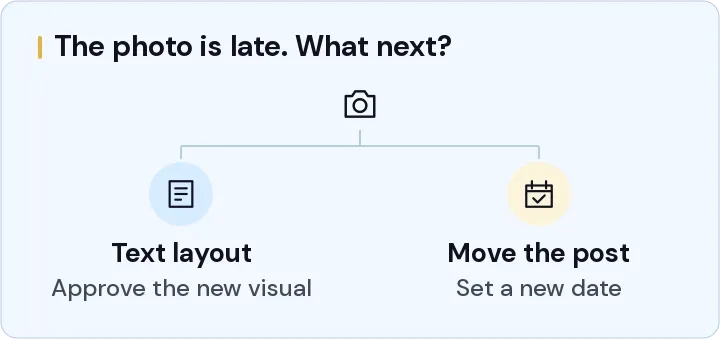
It's worth agreeing in advance what happens if that review runs late. In this example, the creator could move the unfinished post or use an alternative that's already approved. A quiet inbox shouldn't be treated as permission to publish when facts or image permissions are still unresolved.
Decide which content work NST will handle
At NST Media, we help with content calendars and content creation support. Where that support is most useful depends on what's slowing your team down. You may have plenty of ideas but need help turning them into finished posts, or you may need a plan that gives your creator a clearer brief.
For the calendar itself, we'd start with the audience you want to reach and the services or questions the content needs to explain. We can help turn that into post briefs and a production schedule. Your team's role is to supply the service facts and make someone available to approve them.
For creation support, it helps to be specific about the work you'd like us to take on. The scope can set out the captions and visual formats required, the material you'll supply and the preparation or editing NST will handle. We would also agree the review rounds, languages and file handover. If fresh photography or video is needed, who captures it and the permissions required need to be settled before the post is booked into the calendar.
Scheduling, comments and customer messages need clear ownership too. If you'd like those included, they belong in the scope so everyone knows where responsibility passes between NST and your team. A genuine enquiry should reach someone who knows what to do with it.
Use responses to plan the next fortnight
Once the posts are live, the responses give you something to work with for the next calendar. Saving the post link alongside the questions and enquiries it produced helps you see that connection. Views and reactions can be useful context, while completed enquiries need their own record of the service requested and the outcome. Where the source can't be established, it can stay unknown.
Repeated questions can tell you which explanation needs more attention. If people keep asking what happens after they send a request, that may be a useful subject for the next post. A problem with the contact route needs attention too; the website quote guide includes questions you can use to scope changes to an enquiry form or destination page.
The posts that didn't get finished deserve a look as well. Missing photos might call for better source material, while late approvals might mean changing the review schedule. An unused idea can stay on the plan when it's still relevant and the team can get the material together.
Send NST a first planning brief
If you'd like help with your calendar, we can start with your social profiles and the service you want customers to understand. A few real customer questions and a look at the photos or footage you already have will make that conversation more useful. It also helps to know who checks the facts and when they can review drafts.
Plan a calendar your team can produce
Discuss content planning and creation support around your services, source material and review capacity.
Keep reading

What changes the cost of a business website in Sharjah?
Compare website scopes, content responsibilities and running costs. Use a sample Sharjah business brief to request a clearer website quote.

Google Ads or Meta Ads for a UAE service business?
Choose a first campaign around a customer situation, a clear service offer and an enquiry your team can follow up, with a worked planning comparison.

Your contact form says sent. Did the enquiry reach your team?
Trace a test enquiry from the form to the receiving team, using a worked worksheet for submission, delivery, inbox access and a real reply.