
Quick answer
An email campaign is easier to prepare when you can name who should receive it, why the message is useful to them and what happens if they respond. Those decisions give the writer a brief and the person answering enquiries a clear responsibility. The worked example below shows how a small service business could plan one useful email without building a complicated campaign.
It assumes the recipients have chosen to receive the business's marketing. A contact list collected for another purpose needs its own review before you use it for a campaign.
On this page
Start with the audience and its permission
Being able to email someone doesn't establish that they subscribed to marketing. A past enquiry, a business card or an address found online can have a different purpose from a newsletter subscription. Keep a record of how the person joined the audience and what they agreed to receive.
Mailchimp, for example, defines permission as express, verifiable consent and requires it for its marketing service. The rules of the platform you choose matter alongside the requirements that apply to your business and recipients. Mailchimp's permission guidance
Your audience also needs a practical boundary. A maintenance reminder intended for existing subscribers who manage buildings may be more useful than a broad promotion sent to everyone. If you can't explain why a group should receive the message, the brief probably needs more work.
Give the campaign one useful job
Choose a question or decision the recipient recognises. A service email might explain what to prepare before a site visit, share a short checklist or describe a genuine new offer. The email needs enough substance to be helpful before it asks for a response.
A specific next step makes the response easier to handle. “Reply with your building type and the issue you'd like us to review” gives the receiving team a clearer starting point than a general invitation to get in touch.
The campaign can sit alongside a wider content calendar. An email may explain a topic in more depth while a social post introduces the same customer question. Each should still make sense to someone who only sees that one piece.
Use a worked campaign brief
Here is a fictional maintenance business preparing an email for people who subscribed to its updates. The content and responsibilities are examples, rather than a campaign NST has delivered.
Scroll the table to see all columns.
| Brief item | Worked choice | What needs confirming |
|---|---|---|
| Reader | Subscribed property managers interested in planned maintenance | Audience membership and the record of permission |
| Useful topic | What information helps a team prepare for a maintenance visit | The service team approves the requested details |
| Message | A short preparation checklist and an invitation to reply | Copy, sender name and reply address are correct |
| Next step | Reply with the building type, location and issue | A named colleague monitors replies during the agreed coverage |
| Outcome record | A received enquiry with a source and owner | The team can distinguish genuine opportunities from duplicate messages |
A campaign brief doesn't need to be long. It needs to answer the questions that would otherwise come back during writing, design or launch.
Write the message around the reader's situation
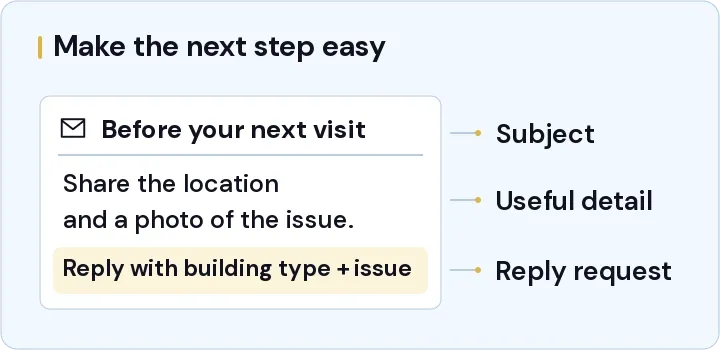
For that fictional business, the first draft could read:
Subject: Before your next maintenance visit
“If you're arranging a maintenance visit, a short description of the issue and a photo can help the team understand what to prepare. Include the building location and how someone can access the affected area. Please keep personal documents and residents out of the photo.
“If you'd like to discuss a visit with us, reply with the building type and the issue you're dealing with. Our office will review the request and get back to you about the next step.”
The business would still need to confirm that those instructions match its service and reply coverage. The draft doesn't promise an appointment or invent a response time.
Check delivery and the destination before sending
Send a test to the people reviewing the campaign. Open it on a phone, follow the links and reply to it. A working layout matters, but so does discovering that replies are going to an inbox nobody monitors.
The person configuring the sending platform should check the current authentication and unsubscribe requirements. Gmail publishes requirements for all senders to personal Gmail accounts, with additional requirements for bulk senders. A platform connection alone doesn't prove that your domain meets them. Gmail's sender guidelines
The campaign also needs the correct sender identity, a functioning way to unsubscribe and an accurate audience selection. If a link leads to a form, use a labelled test to confirm that the completed submission reaches the team. The website brief guide has related questions about form delivery and ownership.
Decide how you'll judge the response
An open rate can be a useful diagnostic with limitations. Mailchimp explains that Apple Mail Privacy Protection can preload tracking pixels, making recorded opens unreliable for affected recipients. Treat those opens with that context. Mailchimp's explanation of privacy protection
For an enquiry campaign, the team can also review actual replies, received forms and the resulting opportunities. A click doesn't establish that someone completed the form, and the same person may reply more than once. Keep a defined reporting period and count a genuine enquiry consistently.
Before planning another send, look at the questions people asked and whether anyone missed a reply. Those details can point to a better message or a change in how the team handles the response.
Discuss the brief and the work you'd like help with
Our Digital Marketing service is a place to discuss campaign planning and the content you need. If the handover is the difficult part, Optimizing Operations covers the process discussion. We can agree the scope around the audience, message and enquiry route.
Send NST the campaign idea and the audience you intend to reach, including who will approve the content and answer the replies.
Plan a useful campaign
Discuss the audience, message, content and reply route before deciding what support you need.
Keep reading

A two-week social media content calendar for a service business
Use a filled-in two-week calendar and reusable production brief to plan posts, assign approvals and scope content creation support.

What changes the cost of a business website in Sharjah?
Compare website scopes, content responsibilities and running costs. Use a sample Sharjah business brief to request a clearer website quote.

A Dubai Google Business Profile checklist for service businesses
Check eligibility, service areas, profile details and enquiry tracking with a worked Google Business Profile checklist for Dubai service businesses.