
Quick answer
A useful Google Business Profile review starts with whether the business qualifies, then looks at the details customers rely on to choose and contact you. It's also worth following an enquiry through to your team, so you can see what happens after someone clicks. The worksheet below shows how a fictional maintenance company could work through those checks and keep a record of completed enquiries.
On this page
Check eligibility before creating a profile
Google generally requires businesses to meet customers in person during their stated hours. An online-only business is not eligible. Google lists specific exceptions in its eligibility guidance.
For a company that visits customers to carry out repairs, a service-area profile may fit. Hiding an address does not make an otherwise ineligible business eligible.
A rented mailing address is not an eligible operating location. Google permits an office in a coworking space only when it has clear signage, receives customers during business hours and is staffed by your business during those hours. Check these conditions before showing a shared office as somewhere customers can visit. Google's location rules
Confirm ownership and use Google's offered verification method
Your business may already have a profile, so a search for its name and city is a useful first step. If you find the listing that represents you, that is the one to claim. The business owner should stay involved in access and ownership even when an agency handles the day-to-day work.
Google determines which verification methods are available. Your options can depend on the business, region and other information; a particular method is not guaranteed. Follow the options shown in your profile. Google's verification instructions
Knowing who controls the owner account makes later changes easier to handle. A record of who has permission to edit the profile also gives your team a clear person to contact when someone joins, leaves or needs different access.
Match the profile to how you actually serve customers
Use the business name customers recognise from your real-world branding. Put service and location details in their appropriate fields rather than adding search phrases to the name. Choose categories that accurately describe the business. Google's representation guidelines
If customers do not receive services at your address, remove that address from public display and define the places you serve. Google allows up to 20 service areas and says the overall area generally should stay within about two hours' driving time from your base. Select areas you can support. Google's service-area instructions
It's useful to try the contact details as a customer would. A call will show who answers the number and what happens outside working hours. Opening the website link on a phone gives you another part of the picture: whether the service is clear and the enquiry route works.
Work through a service-business audit worksheet
For this worked example, imagine a fictional maintenance company that visits homes in Dubai and doesn't receive customers at its office. The table shows the decisions it would need to check, with room to record the evidence behind them.
Scroll the table to see all columns.
| Check | Example decision | Evidence or action to record |
|---|---|---|
| Customer contact | Repairs happen at customers' homes | Owner confirms how the service is delivered |
| Public address | Customers do not visit the office | Check that the address is hidden |
| Service area | Start with the neighbourhoods the team actually covers | Operations lead confirms coverage before the profile is edited |
| Name and category | Use the established business name and the closest accurate category available | Owner checks branding and the available category choices |
| Hours | Display the hours applicable to the business | Check normal hours and relevant holiday changes |
| Enquiry destination | Link to the company's maintenance service page | Test the page, form confirmation and delivery to the team |
| Follow-up | Assign one person to each enquiry | Record who will respond and check for missed requests |
You can use the worksheet for your own business by adding the person responsible and the date of each check. Anything unresolved can stay visible in the same place. A blank evidence field is a useful reminder that the detail still needs attention.
Add useful photos and ask for honest reviews
Photos can help someone understand the work before they get in touch. For a maintenance company, that might be the team or an approved completed repair. If a customer's home is shown, permission and the removal of identifying details belong in the preparation before the photo goes on the profile.
Ask customers for honest feedback after a genuine experience. Google permits review links and QR codes, but prohibits incentives such as discounts in exchange for reviews. Keep public replies relevant and protect customer privacy. Google's review guidance
Track the enquiry after the click
Google's Business Profile performance report distinguishes several interactions. Its calls metric counts clicks on the call button; it does not confirm that someone answered. Website clicks record visits through the profile link. Available metrics depend on the business, and the report can include activity from organic results and Google Ads. Google's performance definitions
Keeping a baseline for a defined period gives you something to compare after changes. In your own records, it helps to distinguish profile interactions from the enquiries the team actually received, so those two figures don't get mistaken for the same result.
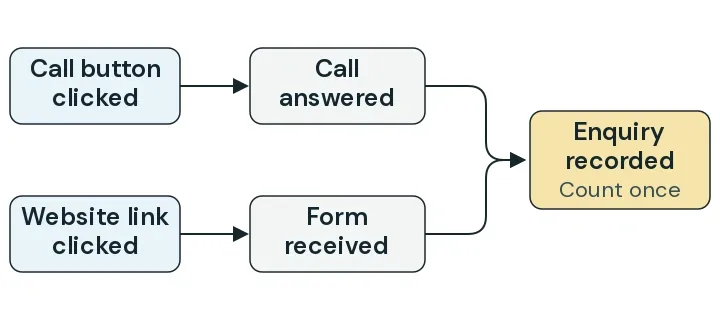
This is the part worth following through with your team. The interaction report can show the click, while your enquiry records tell you whether it reached someone who could respond.
For website visits, campaign tracking parameters, often called UTMs, can help identify traffic from the profile in Analytics. Consistent names make those labels easier to recognise later. A test visit lets you check that the tracking survives the journey to the website. Google's campaign URL guidance.
You can walk through the rest of that journey with a test enquiry:
- Open the profile's website link on a phone.
- Send a clearly marked test enquiry through the destination page.
- Confirm that the intended team receives it and can identify it as a test.
- Check whether your reporting records a completed enquiry and preserves the source where configured.
For genuine enquiries, the useful record includes the service requested, the area and what happened next. If the same person sends a form and later books a call, they still represent one opportunity. Where you can't establish the source, leaving it unknown gives you a more honest record than guessing.
If that test exposes a problem with the destination page, the website quote worksheet can help you describe the changes before asking someone to quote for them.
Review accuracy and outcomes together
A review date gives someone on your team a reason to return to changed hours, contact details and unfinished worksheet items. Comparing enquiries over the same length of time helps too, with a note of other changes such as advertising or seasonal demand that could affect what you're seeing.
Google describes relevance, distance and prominence as the main local ranking factors. Accurate information helps Google understand the business, but completing this checklist does not guarantee a particular Maps position. Google's local ranking guidance
If you'd like help looking through your search presence, NST's SEO Marketing service covers that conversation. Send NST your profile link and website, together with the service you'd like enquiries for and the areas your team actually serves.
SEO Marketing
SEO services for UAE businesses that want sustainable Google visibility through technical optimisation, useful content, local search strategy, and measurable improvement.
Keep reading

Google Ads or Meta Ads for a UAE service business?
Choose a first campaign around a customer situation, a clear service offer and an enquiry your team can follow up, with a worked planning comparison.

Your contact form says sent. Did the enquiry reach your team?
Trace a test enquiry from the form to the receiving team, using a worked worksheet for submission, delivery, inbox access and a real reply.

How to plan an email campaign for a service business
Build a permission-based email campaign brief with a worked message, launch checks and a clear route from a reader's reply to a received enquiry.