
Quick answer
Before a redesign goes live, make a list of the existing pages people use and decide what happens to each address. Keep an address when the page still serves the same purpose. Where a replacement needs a new address, map the old page to the closest useful destination and test that route before launch.
For a service business in the UAE, that list may include links in Google results, proposals, social profiles and customers' saved messages. A better-looking website is easier to launch confidently when someone has also checked where those visitors will land.
On this page
Start with the pages that already have a job
Collect the current sitemap, the navigation and any addresses used in campaigns or sales material. If you have Search Console access, include pages with recorded clicks and links. A small site can begin with a spreadsheet; the important part is having an agreed list instead of relying on someone's memory of the menu.
Give each page a short description of its purpose. “Air-conditioning maintenance for commercial properties” tells a developer more than “old service page”. It helps the business decide whether the new site genuinely has an equivalent page.
Some pages will keep their address and receive new content. Others may be combined or removed. Make those editorial decisions visible before the developer writes redirect rules. A missing replacement page is a content decision to resolve, rather than something a redirect can quietly fix.
Use a small redirect map
Here is a fictional maintenance company's worksheet. These addresses are illustrative and are not changes made to a client site.
Scroll the table to see all columns.
| Existing address | Agreed destination | Acceptance check |
|---|---|---|
| /ac-maintenance | /services/air-conditioning-maintenance | Old address redirects directly to the matching service; new page opens successfully |
| /contact | /contact | Keep the address and test the form and telephone link after launch |
| /summer-offer-2022 | No replacement agreed yet | Decide whether useful content belongs elsewhere; do not send visitors to an unrelated page |
| /projects/office-fit-out | Same address | Keep approved images, project context and a working enquiry route |
The map needs a person who can approve the destination. For a company with several services, that is often someone who understands how customers describe the work. The developer can then implement the rules against an agreed content structure.
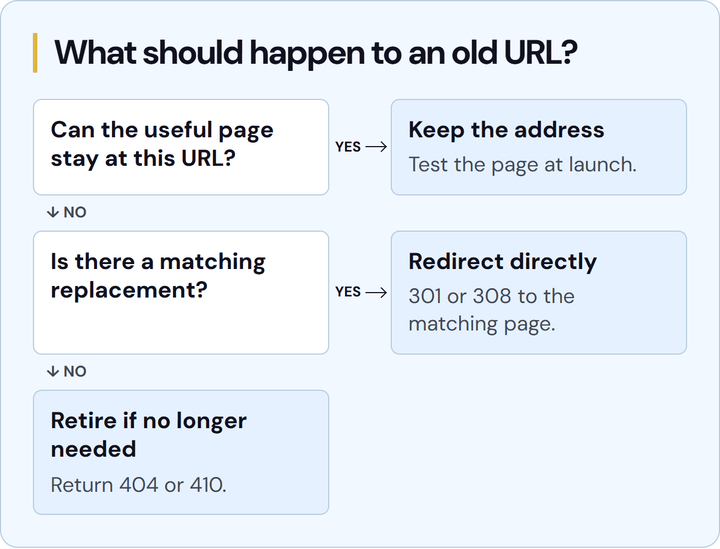
Open the full-size URL decision map (PNG) to save it or copy its link.
Choose the destination before choosing the redirect
Google's site-move guidance recommends mapping old URLs to their new destinations, updating internal links and avoiding unnecessary redirect chains. For a permanent move, the implementation should use an appropriate permanent server-side redirect.
A useful destination answers the same customer need. If two old pages have been combined into a fuller service page, that may be a sensible replacement. Sending every retired page to the homepage gives a visitor much less context and can leave the original question unanswered.
When a page truly has no replacement, record that decision and agree the correct removal behaviour. It should not disappear by accident because its title was absent from a design file. Keep the reasoning with the map so a later editor understands what happened.
Test the old address as well as the new one
Opening a new page successfully proves only that the new page works. Enter the old address too, including important variants that customers may actually have used. Check its response, the final address and the content at the destination. A redirect that ends on an error page still needs fixing.
After a launch, update links the team controls so they go straight to the new destination. That includes navigation, related articles, relevant profiles and current sales material. Keeping those direct links reduces the amount of old routing a visitor has to follow.
Use the live domain for the final checks. A staging preview can help confirm the new design, but production redirect rules and canonical addresses need checking where customers will visit. Include mobile navigation and the enquiry form in that pass.
Keep a launch record the next person can use
The handover should identify the approved map, who implemented it and who checked the results. Keep unresolved rows visible. If a redirect is part of the scope, the website quote worksheet can help put that responsibility beside the other launch work.
Once the new site is live, monitor Search Console and reported errors alongside the old URL list. Search visibility can change during a move; a redirect map does not promise unchanged rankings. It gives the team a concrete starting point for checking the transition and resolving a missing route.
NST's Website Development service can include planning the page structure and launch handover. To discuss a redesign, send us the current website and the pages you expect to change.
Plan the redesign handover
Discuss the pages, content and launch checks that belong in your website scope.
Keep reading

What changes the cost of a business website in Sharjah?
Compare website scopes, content responsibilities and running costs. Use a sample Sharjah business brief to request a clearer website quote.

Why is your business website slow on mobile?
Use a mobile speed review, a worked repair brief and a retest checklist to decide which website problems need fixing first.

A Dubai Google Business Profile checklist for service businesses
Check eligibility, service areas, profile details and enquiry tracking with a worked Google Business Profile checklist for Dubai service businesses.