
Quick answer
With several people answering WhatsApp, it helps to have one named person responsible for each enquiry before the first reply. That person stays with the conversation when the customer sends another message. At a shift change, a note of the open question and next action gives the receiving colleague something useful to accept. A shared inbox can support the process once your team has agreed who answers and who handles exceptions.
On this page
Decide what the owner is responsible for
The owner is the person following the conversation through: reading its history, sending the next reply and making sure the promised follow-up happens. Colleagues can still help, with everyone clear about who is speaking to the customer.
Your shift coverage is a useful place to start deciding that ownership. Some people may handle particular enquiries, such as Arabic-language website briefs, so the allocation rule needs to reflect who is available and able to help. A response deadline also needs someone who can step in when it's missed.
It helps to keep ownership separate from the sales status. An enquiry might be waiting for the customer's page list, for example, while the same person remains responsible for following it up.
Keep ownership when the customer adds a message
When a message arrives, knowing whether that customer already has an owner avoids passing an unfinished conversation around the team. A new message can add information to the same enquiry, with the existing owner keeping the context.
HighLevel's documented Assign To User action assigns contacts. Its Only Apply to Unassigned Contacts option controls whether an existing assignment can be replaced. That is a useful setting to review, but it does not establish that your inbox prevents two people from sending at once. HighLevel's assignment documentation
A colleague opening the thread needs to be able to see who owns it and what has already been said. That gives them a chance to coordinate before replying. When a takeover is needed, a visible ownership change helps the rest of the team understand who is handling the next step.
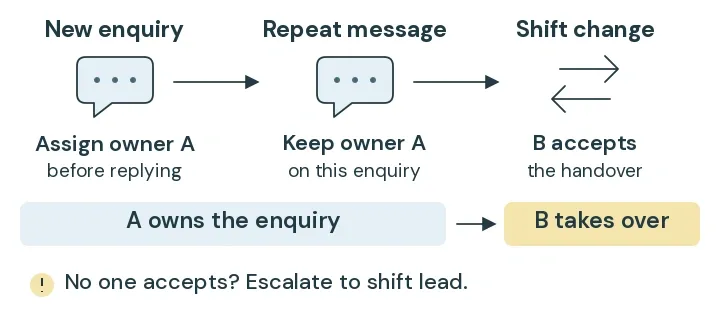
Walk through a three-person example
Here's a fictional example of a service business receiving website enquiries. You can use it to plan the responsibilities and decide what you'd want an inbox or CRM demonstration to show.
In this example, an on-duty responder handles the conversation, with a backup available and a shift lead responsible for the cases neither responder can take. Those roles give an unavailable owner somewhere to turn for help.
Scroll the table to see all columns.
| Event | Agreed handling | Evidence to check |
|---|---|---|
| A new customer asks for a business website | Allocate one on-duty owner before the first reply | The enquiry displays an owner and that person receives the notification |
| The customer adds that Arabic pages are needed | Keep the current owner and add the detail to the brief | A repeat message does not rotate ownership |
| The backup opens the same conversation | Check ownership and recent messages; coordinate with the owner | Only one agreed reply reaches the customer |
| The owner finishes their shift | Record the outstanding question and transfer responsibility | The next responder accepts the handover and can find its context |
| Nobody is available to accept | Escalate to the shift lead's visible exception list | The request remains visible with someone responsible for resolving it |
You can adapt the table to your own staff coverage. Adding your response deadline and the outcome of each check will show where the process is ready and where the team still needs an answer.
Make the handover useful to the next person
For the website enquiry in this example, a useful note could read:
“The customer needs a business website in English and Arabic. We are waiting for their page list before confirming the brief. The next responder should check whether translations will be supplied and record the answer before a quote is prepared.”
Alongside that note, the receiving owner's name and next follow-up time make the handover easier to act on. You also need to know they can see the conversation and have accepted responsibility. An internal notification may have been sent before anyone has picked up the work.
The website quote worksheet gives you more context on the scope details worth collecting while that conversation is under way.
Test the parts an inbox label cannot prove
A demonstration with test contacts and staff accounts lets you see how the setup behaves before relying on it. Trying these scenarios from both responders' views is useful, because each person needs to understand what they can see and what happens when they act.
Scroll the table to see all columns.
| Check | Test action | Expected result |
|---|---|---|
| Existing owner | Send a second inbound message from the same test customer | Ownership remains unchanged unless an explicit transfer is intended |
| Simultaneous replies | Have both responders open the thread and attempt the agreed test | The team can explain which controls prevent duplicate sending and which steps require coordination |
| Shift coverage | Make the usual owner unavailable | The defined backup or exception process takes responsibility |
| Notification delivery | Assign an enquiry to the test owner | The intended person receives the notification after assignment |
| Completion | Mark the test request resolved, then send a new message | The team can explain whether it reopens the request and who owns it |
If a check uncovers something the setup doesn't support, keeping that gap visible gives the team a chance to decide how it will be handled before launch. A manual handover can be a workable starting point when everyone understands the responsibility. The scope should make clear which parts depend on that coordination.
Check the implementation before choosing a tool
HighLevel documents a Customer Replied workflow trigger filtered to WhatsApp. Its assignment walkthrough places the internal notification after the user assignment. Those are documented building blocks; the complete ownership process still needs checking in the account you will use. WhatsApp workflow integration · Assignment and notification sequence
Before settling on a configuration, we'd check the features available in the account, how the number will be set up and what access each member of staff needs. If automated customer messages are included, the current messaging requirements and sending costs need their own check too.
A demonstration of the agreed workflow gives you a basis for deciding whether the hosted inbox fits. If a particular requirement remains unmet, such as a handover that depends on another operational system, that requirement can guide the discussion about custom development. Defining how you'd check it works gives the build a clear purpose.
Review what happens to real enquiries
Once the process is in use, unowned requests, missed follow-ups and duplicate replies are worth reviewing with the team. They can have different causes, so looking at the conversation and the shift coverage helps you decide which part needs attention.
For each genuine opportunity, a record of the requested service and its outcome helps you follow what happened. Someone who messages again or later books a call should still count once. If you can't establish where they came from, the source can remain unknown.
NST's Optimizing Operations service is a place to talk through that handover. Send NST your current enquiry route and tell us who covers it and which step tends to get missed.
Plan the enquiry handover
Define ownership, coverage and the next action before choosing an inbox or building an integration.
Keep reading

What changes the cost of a business website in Sharjah?
Compare website scopes, content responsibilities and running costs. Use a sample Sharjah business brief to request a clearer website quote.

A Dubai Google Business Profile checklist for service businesses
Check eligibility, service areas, profile details and enquiry tracking with a worked Google Business Profile checklist for Dubai service businesses.

A two-week social media content calendar for a service business
Use a filled-in two-week calendar and reusable production brief to plan posts, assign approvals and scope content creation support.